
Source: Generated with ChatGPT
Introduction
Free link building tools are still essential for SEO in 2026. Link building remains one of the hardest parts of SEO, even if you publish great content and optimize your site perfectly. Without backlinks, rankings stay limited.
One of the biggest challenges is outreach and backlink prospecting. Manual processes take too much time, become difficult to manage, and often lead to low reply rates.
Free link building tools make it easier to find contacts, manage outreach, track emails, and build backlinks more efficiently.
The good news? You do not need expensive software to start.
This guide covers the best free link building tools in 2026, without the “fake free” platforms that hide useful features behind a paywall.
What Are Link Building Tools?
Link building tools are software platforms that help you manage the full process of earning backlinks. This includes finding opportunities, contacting website owners, managing campaigns, and tracking results.
In simple terms, they make link building faster, easier, and more organized.
Instead of doing everything manually, these tools automate key parts of the workflow and help you scale your SEO efforts more efficiently.
Most link building tools fall into four main categories.
1. Finding Contact Information
One of the hardest parts of link building is finding the right contact person. Many tools help you discover verified email addresses linked to websites, authors, and companies.
Common contact types include:
- Editor emails
- Marketing contacts
- Founder emails
- Journalist contact details
This saves time during prospecting and reduces the risk of sending emails to invalid addresses.
2. Managing Outreach Emails
Many link building tools include features for sending personalized outreach campaigns at scale. Instead of writing each email manually, you can use templates and automation while still keeping messages personal.
Common features include:
- Custom subject lines
- First name personalization
- Email scheduling
- Personalized templates
This helps you maintain quality while scaling your outreach efforts.
3. Automating Follow-Ups
Follow-ups are often where backlinks happen. Manually tracking them is time-consuming and easy to forget.
Link building tools solve this by automatically sending follow-up emails when prospects do not reply.
This keeps your outreach consistent and improves response rates without extra manual work.
4. Tracking Performance
Most link building tools also include analytics that show how your campaigns perform. This helps you understand what works and improve future outreach.
Common metrics include:
- Open rates
- Click rates
- Reply rates
- Bounce rates
Over time, this data helps you refine your strategy and focus on the most effective outreach methods. These tools also help strengthen your backlink profile.
Best Free Link Building Tools
Hunter
Hunter is one of the most popular email outreach tools for SEO professionals and link builders.
It is primarily known for helping users find verified professional email addresses associated with websites.
Key Features
- Email finder
- Domain search
- Email verification
- Outreach campaign management
- Chrome extension
Free Plan Limits
- 25 searches/month
- 50 verifications/month
- Limited campaign features
Pros
- Very beginner-friendly
- Accurate email verification
- Excellent Chrome extension
- Fast domain searches
Cons
- Free plan is fairly limited
- Campaign features are less advanced than dedicated outreach platforms
Best For
Finding verified contact emails quickly for link building campaigns.
Snov.io
Snov.io is an all-in-one link building tool that combines email discovery, contact management, and campaign automation in one platform.
It helps SEO teams manage prospecting, organize contacts, and streamline link building campaigns more efficiently.
Key Features
- Email finder
- Drip campaigns
- CRM system
- Email verification
- Automation sequences
Free Plan Limits
- 50 monthly credits
- Limited automation
Pros
- Strong automation features
- Built-in CRM
- Great for scalable outreach
- Easy sequence creation
Cons
- Learning curve for beginners
- Credits can disappear quickly
Best For
Small SEO teams and marketers looking for an all-in-one link building platform.
GMass
GMass is a Gmail-based email tool for sending personalized campaigns directly from your inbox.
It works well for link building because it simplifies email outreach, follow-ups, and campaign management without complicated setup.
Key Features
- Gmail mail merge
- Automated follow-ups
- Personalization
- Campaign analytics
- Google Sheets integration
Free Plan Limits
- Daily sending restrictions
- GMass branding
Pros
- Extremely easy to use
- Works directly inside Gmail
- Great personalization
- Ideal for beginners
Cons
- Limited automation on free plan
- Branding included in emails
Best For
Simple email campaigns for link building and SEO outreach.
Mailtrack
Mailtrack is a lightweight Gmail tool for tracking email opens.
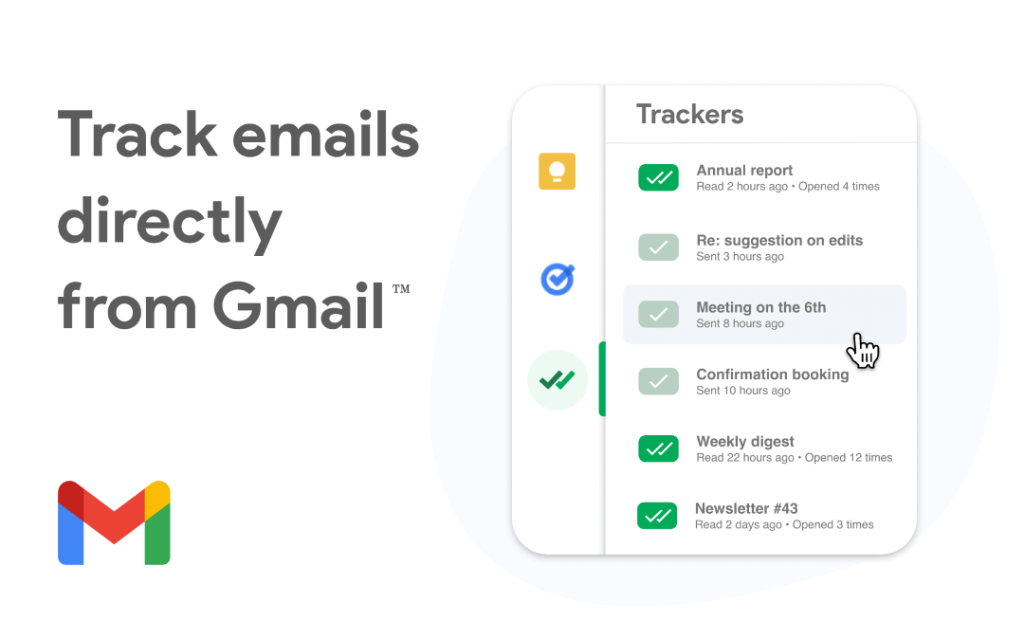
It helps link builders monitor engagement and see whether prospects open their emails.
Key Features
- Email open tracking
- Real-time notifications
- Gmail integration
- Basic analytics
Free Plan Limits
- Mailtrack signature added to emails
Pros
- Very simple setup
- Helpful for outreach monitoring
- Real-time tracking
- Lightweight interface
Cons
- Not a full outreach suite
- Limited campaign functionality
Best For
Tracking email opens during link building campaigns.
HubSpot CRM
HubSpot CRM offers one of the most generous free CRM plans available.
It helps organize contacts, outreach pipelines, and campaign tracking.
Key Features
- Contact management
- Email tracking
- Pipeline organization
- Gmail integration
- Basic automation
Free Plan Limits
- Limited advanced automation
- Some features locked behind paid tiers
Pros
- Powerful free CRM
- Excellent organization
- Easy contact management
- Strong integrations
Cons
- Can feel overwhelming initially
- Advanced features are expensive
Best For
Managing outreach pipelines and contacts.
Help a Reporter Out (HARO)
Connectively (formerly HARO) connects journalists with expert sources.

For SEO professionals, it is a powerful way to earn high-authority backlinks through digital PR.
Key Features
- Journalist requests
- Media opportunities
- Authority backlink potential
- Niche filtering
Free Plan Limits
- Limited filtering
- Competitive opportunities
Pros
- Can earn extremely strong backlinks
- Great for authority building
- Free to start
- Excellent for SaaS and experts
Cons
- Highly competitive
- Time-sensitive responses required
Best For
Earning high-authority editorial backlinks.
Comparison Table of Free Link Building Tools
Here’s a quick overview of the best free tools for outreach, email discovery, CRM management, and backlink opportunities.
| Tool | Free Plan | Main Feature | Best Use Case |
| Hunter.io | Yes | Email finding | Discovering contact emails |
| Snov.io | Yes | Outreach automation | Full outreach workflows |
| GMass | Yes | Gmail outreach | Personalized campaigns |
| Mailtrack | Yes | Open tracking | Monitoring engagement |
| HubSpot CRM | Yes | CRM management | Organizing outreach pipelines |
| HARO / Connectively | Yes | Journalist requests | Earning authority backlinks |
Free link building tools become much more powerful when you combine them into one workflow.
Best Free Outreach Workflow (Step-by-Step)
Instead of relying on one platform, you can combine multiple tools into a complete link building system for $0.
Step 1: Find Contact Emails with Hunter.io (Free Link Building Tool)
Start by identifying relevant websites in your niche.
Use Hunter.io to:
- Find editor emails
- Discover author contacts
- Verify addresses before sending
This improves deliverability and reduces bounce rates. Clean data also helps you avoid wasting time on invalid contacts.
Step 2: Organize Prospects in HubSpot CRM for Link Building
Once you gather contacts, store them in HubSpot CRM.
You can organize prospects by:
- Website authority
- Outreach stage
- Response status
- Campaign type
This keeps your workflow structured. It also makes it easier to track progress across different campaigns.
Step 3: Send Personalized Outreach with GMass
Import contacts into GMass through Gmail or Google Sheets.
Focus on:
- Personalized subject lines
- Short pitches
- Relevant value propositions
Avoid generic mass emails. Personalization improves response rates and builds trust with prospects.
Step 4: Track Link Building Emails with Mailtrack
Mailtrack shows:
- Who opened emails
- When they opened
- Which prospects may need follow-ups
This helps you prioritize warm leads. It also improves timing for follow-up messages.
Step 5: Earn Editorial Backlinks with HARO
Monitor HARO journalist requests daily.
When relevant opportunities appear:
- Respond quickly
- Provide concise expert quotes
- Include credibility signals
Strong responses increase your chances of landing high-authority backlinks from media sites.
Why the Stack Approach Works
Each tool handles a different part of the link building process, which makes your workflow more efficient.
- Hunter.io = prospecting
- HubSpot = organization
- GMass = outreach
- Mailtrack = tracking
- HARO = authority backlinks
Together, these free link building tools create a complete system without paid subscriptions.
Limitations of Free Link Building Tools
Free link building tools work well for beginners and small SEO campaigns. However, most free plans come with limitations.
As your campaigns grow, these restrictions can slow down your workflow and make scaling more difficult.
Sending Limits
Most free tools limit how many emails and contacts you can use each month.
This makes it harder to run consistent outreach campaigns at scale. Once you hit these limits, your workflow often stops or slows down.
- Daily email sends
- Monthly credits
- Number of contacts
These limits can quickly become restrictive if you run multiple campaigns at once. Some tools also reduce functionality after you reach usage caps.
Limited Automation
Many advanced features stay locked behind paid plans.
This means you often need to handle repetitive tasks manually. As a result, scaling outreach takes more time and effort.
- Multi-step sequences
- AI personalization
- Smart scheduling
Without automation, managing campaigns takes more manual work. This becomes harder as your outreach volume increases.
Branding in Emails
Some free tools add default branding to your emails.
This can affect how professional your outreach looks. In some cases, it may also reduce response rates.
- Signatures
- Logos
- Promotional footers
This branding may make emails look less professional. In some cases, it can also reduce trust with prospects.
Not Ideal for Large Campaigns
Free tools are mainly designed for small campaigns and testing.
They work well at the start, but they struggle when volume increases. Larger teams often need more control and stability.
- Better deliverability
- Team collaboration features
- Advanced reporting
- Dedicated infrastructure
Free plans usually work best for small and medium-sized campaigns. Larger teams often need paid tools to scale efficiently.
When Should You Upgrade to Paid Tools?
Free tools work well initially, but eventually scaling requires better infrastructure.
You should consider upgrading when:
You Are Scaling Campaigns
If you send hundreds of emails each week, free limits start to slow you down. You often hit daily or monthly caps that stop your workflow. At scale, you need tools that support higher volume without interruptions.
- Daily email sends
- Monthly credits
- Number of contacts
These limits become restrictive when you run multiple campaigns at once.
You Need Better Automation
Paid plans unlock more advanced automation features.
Free tools often force you to repeat tasks manually. This makes scaling slower and less efficient.
- Smart follow-ups
- Dynamic personalization
- Workflow automation
Without these features, campaign management takes more time and effort. This becomes harder as your outreach grows.
You Manage Large Teams
Large teams need better collaboration tools to stay organized. Free plans often lack proper team features.
This can lead to confusion and inconsistent workflows.
- Collaboration features
- Shared inboxes
- Team permissions
- Campaign management tools
These features help agencies and SaaS teams work more efficiently together.
Deliverability Becomes Critical
At scale, email deliverability becomes one of the most important factors in outreach success.
Small issues can affect entire campaigns. Paid tools help you maintain a stronger sender reputation and better inbox placement.
- Inbox placement
- Domain warming
- Reputation monitoring
Strong deliverability ensures your emails actually reach prospects. This directly impacts reply rates and campaign performance.
Conclusion: Building Links with Free Tools
Link building stays one of the most important parts of SEO, but it takes time and structure to get right. Free link building tools help you find prospects, run outreach, and track results without high costs.
The best results come from using multiple tools together. You can combine Hunter.io, HubSpot CRM, GMass, Mailtrack, and HARO to build a simple and effective workflow.
Grow Your Online Presence with Upvelix
Want to grow your online presence? Get in touch with Upvelix and start building a stronger SEO foundation today.